How to Deal with Roblox Toxic Players: A Practical Guide
Learn practical, step-by-step methods to deal with toxic players in Roblox, including muting, reporting, privacy settings, and safety tips for a healthier gaming community.


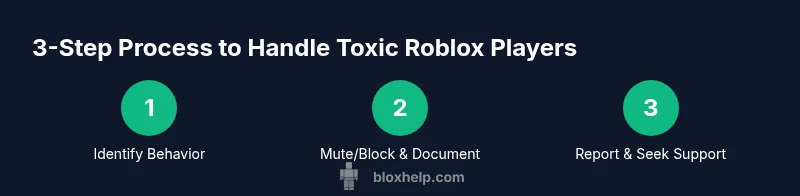
If you’re wondering how to deal with roblox toxic players, the first move is to mute or block, then report when needed and tighten privacy. Use in-game tools to ignore disruptive players, document incidents, and involve trusted friends or guardians if necessary. This quick guide outlines practical steps and safety tips to maintain a positive Roblox experience.
Understanding Roblox Toxicity: What It Looks Like
If you’re wondering how to deal with roblox toxic players, the first step is recognizing toxicity patterns rather than reacting to a single comment. Toxic behavior includes harassment in chat, repeated insults tied to identity, spammy links, and attempts to derail group activities. Some players may push others to break rules or share personal information. The impact goes beyond momentary frustration: it can erode confidence, disrupt teamwork, and discourage newcomers. According to Blox Help, consistent use of mute, block, and reporting tools builds a safer, more welcoming experience for everyone. This section helps you spot signs early so you can respond with calm, consistent boundaries and avoid escalating conflicts. Remember that safety and respect are a team effort, and your responses influence the community atmosphere as much as the individual incident.
Setting Boundaries: Tools and Privacy Settings
The first line of defense against toxicity is boundary-setting. On Roblox, you can mute or block players, adjust who can chat with you, and control who sees your profile. Start by muting disruptive players during a session; if harassment continues, use the Block feature to prevent further messages and interactions. Privacy settings let you choose who can message you, who can join your games, and who can invite you to groups. Consider turning off voice chat or setting it to friends only if available in your region. For younger players or shared devices, use parental controls and account restrictions to limit exposure to toxic content. Enable Roblox’s reporting shortcuts from the in-game menu for quick action, and save a short description of what happened. Keep a personal log of incidents: date, time, player name, game, and a brief description. Consistency is key—set expectations with friends and teammates about respectful communication and consequences for violations. As you apply these boundaries, you’ll notice fewer interruptions and a clearer path to fun gameplay.
How to Report and Document Incidents
Roblox’s reporting system is the primary channel to address toxic behavior, but it works best when you provide clear, factual evidence. Start by using the in-game report button and categorize the issue (harassment, hate speech, inappropriate content, cheating, impersonation). Take screenshots or video clips that show the behavior, timestamps, and usernames involved. Avoid editing or embellishing evidence; unaltered, chronological records help moderators take appropriate action. If the incident occurs in a private server or group chat, capture chat logs and any links shared by the user. After you submit a report, note the case number and follow up if progress isn’t visible. In some cases, you may need to contact Roblox Support directly, especially for severe or ongoing issues. Remember that moderation takes time, and one report might trigger a broader review of a server or community. While you wait, continue to enforce your personal boundaries and avoid engaging further with the toxic player.
Dealing with Guilds, Clans, and Public Servers
Toxic players can be especially disruptive in group activities. When playing in public servers, establish ground rules with your group: designate a moderator, agree on callouts for rule-breaking, and decide on a safe exit plan if harassment occurs. In private servers, you have more control; invite trusted friends only, set server rules, and disable direct joining by unknown players. Use server moderation tools if available, such as kicking or banning players in spaces you manage. If you’re a developer running a game, implement automated checks for harassment using filtered chat and report triggers, plus a spectator mode for witnesses. Encourage players to report incidents without retaliation, and model the behavior you want to see—calm, constructive responses reduce the credibility of toxic players. Finally, foster a culture of inclusivity by highlighting positive behavior and providing recognition for constructive teammates.
Safety for Younger Players: Parental Controls and Guidance
Younger players require additional protections. Parents should review account settings together, enable child accounts, and use parental controls to limit gameplay time, chat access, and in-game purchases. Teach kids how to handle toxicity with a short action plan: ignore, report, log, and walk away. Role-play scenarios help kids practice safe responses. Emphasize not sharing personal information, not engaging in arguments, and seeking adult help when needed. Roblox systems allow guardians to monitor activity and adjust settings as needed. If you encounter harassment, suggest taking a break or switching to moderated servers with trusted players. The goal is to empower kids to enjoy games while staying safe and respected.
Building a Positive Community: Moderation and Peer Support
A healthy Roblox community reduces toxic incidents. Supportive peers can de-escalate conflicts by modeling respectful communication and acting as witnesses. Encourage moderators to enforce rules consistently and publish clear server guidelines. For developers, incorporate anti-toxicity features into your games: chat filters, auto-mutes for offensive terms, and dedicated reporting paths. Provide training resources for players on conflict resolution, and recognize players who model teamwork. When toxicity occurs, collect witness accounts and coordinate with moderators to preserve game integrity. The aim is a culture where players feel safe, heard, and empowered to stand up for each other. This approach aligns with community guidelines commonly recommended by reputable gaming communities and platforms.
When to Seek Help: Escalation and Support Channels
If toxicity escalates to threats or persistent harassment, don’t wait for moderation alone. Seek help from trusted adults, school resources, or Roblox support channels. For younger players, involve a guardian who can assist in reporting and enforcing boundaries beyond the game. If you’re a creator or moderator, escalate to Roblox Support with the full dossier: incident summary, time-stamped logs, and copies of evidence. In extreme cases, consider stepping away from the problematic server or taking a break from Roblox until the situation stabilizes. Your safety comes first, and you’re never obligated to tolerate abuse. A proactive, respectful response helps you regain control of your experience. The emphasis is on practical steps and supportive networks rather than venting or retaliation.
Authority and Resources: Official Guidelines and Best Practices
For additional guidance on online safety, check StopBullying.gov and the FTC’s digital safety tips. These official sources provide general guidelines for recognizing harassment, reporting responsibly, and protecting personal information in online spaces. The U.S. Department of Education also offers insights on digital citizenship that can be applied to gaming communities and school-based programs. Remember to cross-reference Roblox’s own safety center and community standards for the most current rules and reporting options. By combining platform tools with evidence-based guidance from trusted sources, you’ll reinforce a safer gaming environment.
Common Pitfalls and Best Practices
Common mistakes include engaging with toxic players instead of muting or reporting, waiting too long to act, or assuming you must tolerate harassment. Avoid sharing personal information or continuing conversations that fuel toxicity. Always gather evidence before reporting, and don’t retaliate in chat or public forums. A steady, calm response—paired with documented reports—tends to influence moderation outcomes more effectively than impulsive reactions. Practice patience and consistency; over time, these habits shape a more respectful community and reduce the frequency of toxic incidents. The best practices emphasize prevention, documentation, and constructive engagement.
Putting It All Together: A 1-Week Action Plan
Use this sample plan to implement what you’ve learned. Day 1–2: Review privacy settings and mute/block any persistently toxic players. Day 3: Collect evidence (screenshots, logs) and note timestamps. Day 4: Submit a precise report with context and witnesses. Day 5: Adjust server settings or join moderated spaces; encourage friends to do the same. Day 6: Share a positive behavior example with your group and recognize respectful players. Day 7: Reflect on the week and adjust your plan for ongoing safety. The recurring themes are documentation, timely reporting, and fostering positive interactions. The Blox Help team recommends treating these steps as a routine part of gameplay rather than a one-off response.
Tools & Materials
- Roblox account access(Ensure you can access reporting and privacy settings.)
- Stable internet connection(Keep connectivity steady during play and documentation.)
- Screenshots/video capture tool(Capture evidence with timestamps; avoid editing.)
- Personal incident log(Record date, time, players involved, and context.)
- Trusted friend or guardian(Support and validation for younger players.)
- Server moderation access (for devs)(If you control a private server or game.)
Steps
Estimated time: 15-45 minutes
- 1
Identify behavior and set intent
Observe the interaction, identify the toxic pattern, and decide your response style (muting, blocking, or reporting) before reacting. This helps you stay calm and consistent.
Tip: Take a breath before acting; a calm response reduces escalation. - 2
Mute and blocks first
Mute the user during the session to stop disruptive messages. If abuse continues, block them to prevent further contact in-game and in chat.
Tip: Use the fastest mute/block shortcut from the in-game menu. - 3
Document the incident
Capture timestamps, chat logs, and any links or codes shared. Save screenshots or video clips that clearly show the behavior.
Tip: Keep evidence in its original, unedited form for credibility. - 4
Submit a precise report
Use the in-game report tool, categorize the issue, attach evidence, and provide context. Note the affected game and server if relevant.
Tip: Include at least one witness who can corroborate the incident. - 5
Review and adjust privacy settings
Tweak who can message you, join your games, or invite you to groups. Consider enabling stricter privacy on younger accounts.
Tip: Set chat to friends-only where available. - 6
Seek support and reflect
Reach out to trusted friends or guardians, and participate in positive groups to reinforce healthy behavior. Review what worked and refine your plan.
Tip: Share safe, constructive feedback to encourage better community norms.
Questions & Answers
What counts as toxic behavior in Roblox?
Toxic behavior includes harassment, hate speech, spam, doxxing attempts, and coercion to break rules. It can occur in chat, voice chat, or private messages and disrupts others’ experience.
Toxic behavior includes harassment, hate speech, and spamming that disrupts play. Always report and mute when needed.
How do I mute or block someone in Roblox?
Tap the user’s name, open their profile, and select mute or block from the menu. You can also adjust chat settings in your privacy controls.
Open their profile and select mute or block from the menu; adjust privacy settings if needed.
How do I report a toxic player?
Use the in-game report button, choose the category, attach evidence, and include context like game name and server. Keep a record in case you need to follow up.
Click the report button, pick a category, attach evidence, and provide context.
Will reporting remove me from a server?
Not typically, but moderation actions may affect the offender. You may be moved to a different server if needed for safety.
Reporting doesn’t usually eject you; offenders may be moderated or moved away.
Can I adjust chat settings for safety?
Yes. Use privacy controls to limit who can message you and join games. Disable voice chat or set it to friends only where available.
Yes, adjust privacy to limit messages and, if needed, disable voice chat.
What if harassment continues after reporting?
Escalate to Roblox Support with a full dossier: incident details, evidence, and prior reports. Consider stepping away from the offender and seeking offline support if needed.
If it continues, contact Roblox Support with your evidence and stay safe.
Watch Video
The Essentials
- Mute or block toxic players immediately
- Document incidents with timestamps and clear evidence
- Report behavior promptly and accurately
- Tighten privacy settings to reduce exposure
- Seek support from friends/guardians and foster positive communities