How to Disable a Roblox Account: Step-by-Step Guide
Learn how to disable a roblox account with a clear, step-by-step process. This guide covers prerequisites, contacting Roblox Support, data considerations, and safety tips. Practical guidance from Blox Help to help you navigate account deactivation smoothly.


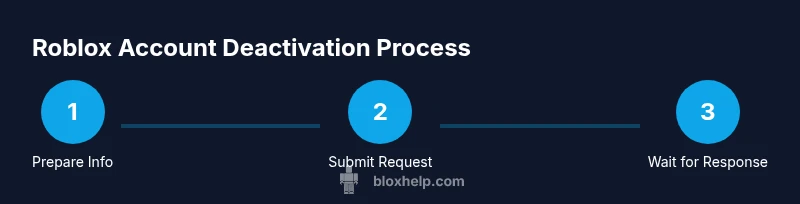
This guide explains how to disable a roblox account by submitting a formal deactivation request to Roblox Support. You’ll need the account username, the email on file, and any verification details Roblox requests. The process is manual and may take several days to complete. Follow these steps to protect your data and prevent future access after deactivation. According to Blox Help, outcomes depend on verification and policy.
What it means to disable a Roblox account
Disabling your Roblox account means you stop being able to sign in, effectively pausing access to games, friends, and purchases tied to that account. It's not always the same as deleting the account, which can have lasting data-retention implications. Roblox's official path to deactivation is typically handled through support rather than an in-app toggle. The Blox Help team has observed that cases are evaluated individually, with identity verification and policy constraints shaping the outcome. If you’re taking a break or addressing a security concern, deactivation aims to minimize risk while keeping the door open for reactivation later. If you share access with a family member or child, consider parental controls to prevent accidental reactivation during the review period.
Why pause or deactivate instead of deleting
There are scenarios where you might prefer to pause activity rather than permanently deleting data. Pausing preserves your progress, purchases, and friends list for a future return, while a full deletion can erase achievements and inventories and complicate reactivation. From a privacy perspective, deactivation reduces visibility and login attempts but may not erase every personal data instantaneously; you may need to request data deletion separately if offered by Roblox policies. If you suspect credential compromise, deactivation is a prudent first step to limit misuse while you secure your account. Throughout, keep records of communications and ensure you clearly state whether you want temporary deactivation or permanent removal.
Official options and Roblox support policy
Roblox provides account help through its Help Center and Support channels. There is no public, one-click disable option; instead, you typically initiate a deactivation request via a support ticket or contact form. The process is designed to verify ownership and ensure the action is authorized. The Blox Help team has seen that decisions depend on identity verification and Roblox policy, and outcomes vary. When you contact support, explain that you want to deactivate or pause the account, provide the username and email, and request confirmation of the outcome. You may be asked to answer security questions or supply proof of ownership. Prepare to wait for a response and to follow any additional steps Roblox requests.
Information you should gather before contacting support
Before you reach out, assemble the essentials:
- Username on Roblox (the exact handle you want deactivated)
- Email address registered to the account
- Date of last login or approximate activity window
- The reason for deactivation (privacy, security, taking a break, etc.)
- Proof of ownership if available (recent purchases, linked phone, or recovery options)
- Device type and browser used when you last accessed Roblox
- Any relevant screenshots or prior correspondence with Roblox
Having this information ready speeds up the process and reduces back-and-forth with support.
How to prepare your deactivation request
Draft a concise, factual request that clearly states you want to deactivate or pause the account. Include the exact username and the email on file, plus a brief justification. Mention whether you want a temporary pause or permanent deactivation. Attach any proof of ownership if you have it and reference the preferred contact method for Roblox to reach you. A well-prepared request minimizes delays and makes it easier for the support agent to process your ticket.
What to expect after you submit a deactivation request
After submitting, you’ll typically receive an automated confirmation with a ticket number. Roblox Support may reach out for additional verification or clarifications. The review process can take several days to a week, depending on workload and complexity. During this period, monitor your email and the Roblox Help Center for updates. If more information is requested, respond promptly to keep the process moving.
Parental controls and child accounts
If you’re managing a child account, parental controls can influence the deactivation flow. You may need the parent's Roblox account credentials or explicit consent to deactivate the child account. Some regions require additional verification steps when a minor is involved. Plan ahead by reviewing your family settings and ensuring that you have the authority to request deactivation on behalf of the child account.
Authority Sources
For privacy and security best practices that relate to account management, consult reputable sources such as the FTC and privacy authorities. These resources provide guidance on data handling, account security, and user rights when you consider deactivation or data deletion.
- FTC: https://www.ftc.gov
- Australian Privacy: https://www.privacy.gov.au
- NIST: https://www.nist.gov
Tools & Materials
- Roblox account username(Exact handle to deactivate)
- Registered email on file(Email linked to the Roblox account)
- Device with internet access(Any computer or mobile device)
- Access to registered email for verification(You may need to confirm ownership)
- Proof of ownership (optional)(Receipts, purchases, or recovery options)
- Roblox Help Center access(Help Center or support contact form)
- Patience for processing(Response times vary; plan accordingly)
Steps
Estimated time: up to several days
- 1
Prepare and verify your details
Gather your username, the email on file, and any verification details Roblox may ask for. Verifying ownership upfront reduces delays and helps support confirm you’re the account owner.
Tip: Have your last login date and purchase history handy to speed verification. - 2
Open the Roblox Help Center
Navigate to the Roblox Help Center and locate the Support or Contact Us option. Choose the option that best matches account issues and deactivation needs, so your ticket goes to the right team.
Tip: Use a stable browser and keep screenshots ready if you need to attach evidence. - 3
Submit a clear deactivation request
Write a concise message stating you want to deactivate or pause the account, include the username and registered email, and specify whether the deactivation is temporary or permanent.
Tip: Be explicit about your desired outcome to avoid back-and-forth questions. - 4
Attach proof of ownership (if available)
If you have receipts, linked phone numbers, or other ownership proofs, attach them to the ticket. This supports a quicker verification process.
Tip: Redact sensitive information not needed for verification. - 5
Submit the ticket and record the reference
Submit the form and note the ticket number. Save it for future updates and follow-ups with Roblox Support.
Tip: Set a reminder to check the ticket status after the typical response window. - 6
Respond promptly to any follow-up
If Roblox requires additional verification or details, reply quickly. Delays can extend processing time.
Tip: Keep your communications clear and focused on ownership and requested outcome. - 7
Confirm deactivation status
Once Roblox confirms, verify sign-out across devices and confirm the account is inaccessible. Consider updating security settings on linked services.
Tip: Change related passwords and review linked apps to prevent reuse. - 8
Plan for potential reactivation
If you might want to return, ask Roblox about reactivation options and any data retention rules that apply to your account.
Tip: Document steps for reactivation so you can resume gameplay quickly later.
Questions & Answers
Can I delete my Roblox account myself, without contacting support?
Roblox does not offer a public self-service delete option. Most deactivations require a support request and verification. Always follow Roblox's official guidance and be prepared for a manual review.
Roblox generally requires a support request and verification for deactivation; there isn't a direct self-delete option.
Will deactivating erase all my data immediately?
Deactivation reduces access and visibility, but data-retention policies may still apply. For complete data erasure, you may need to request data deletion if offered by Roblox policies.
Deactivation reduces access, but some data may remain; data deletion policies vary by Roblox.
How long does it take to deactivate an account after I submit a request?
Processing times vary based on verification and backlog. Expect a delay, and monitor your email and the Help Center for updates.
Processing times vary; check your email and Roblox Help Center for updates.
Can I reactivate my account after deactivation?
Reactivation is usually possible by contacting Roblox Support and following their reactivation process. Identity verification may be required again.
Reactivation is possible by contacting support and may require re-verification.
What information should I include to speed up the process?
Include the exact username, registered email, a clear reason for deactivation, and any ownership proof you have. Attach relevant screenshots if available.
Include username, email, reason, and ownership proof to speed things up.
Does deactivating a child account require parental approval?
For child accounts, parental controls and account ownership details apply. You may need the parent's consent and may have to follow regional requirements.
Parental controls may be involved; expect parent consent and regional checks.
Watch Video
The Essentials
- Initiate deactivation via Roblox Support using a clear request.
- Prepare username, email, and verification details in advance.
- Expect a varied timeline and possible follow-up questions.
- Reactivation is possible; follow Roblox guidance and verify ownership.