Delete Roblox Account: Step-by-Step Guide
Learn how to remove a Roblox account safely, with guidance on ownership verification, data backup, and official channels. This step-by-step guide from Blox Help covers the entire process to remove roblox account.


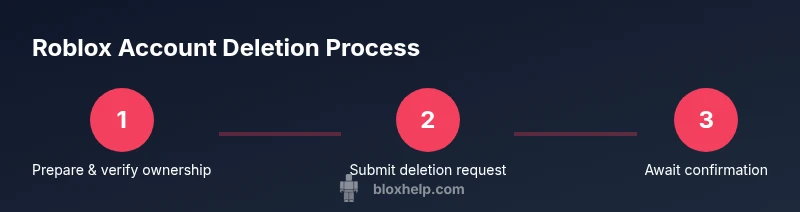
To remove roblox account, you must submit a deletion request through Roblox support and confirm ownership of the account. There is no one-click self-delete option. Expect a verification step, a confirmation email, and a processing period as the support team handles your request. This quick guide lays out the essential steps you’ll follow to remove roblox account.
Why remove your Roblox account
If you’re preparing to remove roblox account, you’re likely weighing privacy, data control, or simply choosing a different online identity. Roblox stores a lot of personal data, and some players decide they want to reset their digital footprint or stop receiving marketing messages. The Blox Help team found that many users opt for deletion after a prolonged pause in activity or after transferring interest to other platforms. Remember, there isn’t a simple “delete this account” button in the Roblox app. Deletion requests are handled by Roblox Support to verify ownership and protect user data. This section helps you understand the motivation behind remove roblox account and what you should expect from the process.
The decision to remove roblox account can come from privacy concerns, age-related controls, or a switch to a new account. If you keep data tied to your account, you may lose game progress, purchases, and access to shared experiences. By clarifying your goals before starting, you reduce the risk of accidental data loss and confusion later in the process.
Quick reality check: backing up before you begin
Before you initiate remove roblox account, consider exporting important information like your username, linked emails, and any receipts from purchases. Roblox does not offer a built-in export tool for every asset, so you’ll want to capture essential details (e.g., purchase dates, item names) for your records. This preparation minimizes regret if you realize later you needed some data from your account. A careful plan also helps you align expectations with the official deletion process and avoid surprises.
Important considerations before you begin
Removing roblox account is a significant action with long-term effects. You may lose access to Robux, game progress, and any items tied to your account. If your Roblox profile is connected to other services or platforms, those links may be affected as well. You should inform any friends or communities you’ve collaborated with, and consider whether you want to disable notifications or reset email addresses associated with the account. Understanding these ramifications ensures you approach the process with clear intent and fewer mistakes.
Data you may lose and what to back up
Deleting roblox account typically results in the loss of access to your game library, in-game items, and any purchases tied to that account. If you’re hoping to preserve value, start by documenting the items you value most and saving any proof of purchase. If you have multiple devices connected to Roblox, you should note which devices remain authenticated. Backing up this information helps you decide whether the deletion is worth it and makes future transitions smoother.
Official channels for account deletion (what to expect)
Roblox handles deletion requests via their support system rather than a self-serve button. The process usually starts when you contact Roblox Support and submit verification details proving you own the account. You’ll be asked for identifiable information like the registered email, username, and sometimes a security response. Expect some back-and-forth as the support team confirms your identity and the intent to delete. This is a security measure to prevent unauthorized deletions and protect user data.
Step-by-step overview (high-level) to remove roblox account
This section provides a high-level flow you’ll encounter when initiating remove roblox account: gather account details, contact Roblox Support with a formal deletion request, verify ownership, wait for confirmation, and finally receive removal confirmation. While this overview omits specific keystrokes, it sets the framework for the detailed steps that follow in the dedicated guide. You’ll also learn about possible delays and how to monitor the status of your request.
Precautions and tips for a smooth deletion
- Ensure you truly want to remove roblox account; this action is often permanent. - Have ready the email address used for Roblox and any proof of ownership. - Do not delete the account without first backing up essential data. - Communicate clearly with Roblox Support and respond promptly to verification requests. - If you rely on purchases, plan for possible loss of access to those items.
Alternatives to permanent deletion
If you’re unsure about permanent removal, consider deactivating or hiding your profile, or muting notifications. Some players prefer to delete only certain linked services while keeping the core account intact. Alternatives help you regain control over your data without fully erasing your history. This approach can be practical if you’re leaving Roblox but want the option to return later.
After deletion: what to expect
Once your remove roblox account is processed, you should receive a confirmation from Roblox Support. Expect a final record of the deleted data and a notification about what happens to any remaining linked services. Remember that access to game progress, purchases, and affiliations will be terminated. You may want to monitor related emails for updates or follow-up inquiries from the support team.
Authority sources
This guide references best practices and official channels to delete roblox account. For broader privacy guidelines and data protection principles, consult credible sources over the web, including established government and university resources. These references help you understand the larger context of account deletion and data privacy.
Tools & Materials
- Device with internet access(Use a trusted device; avoid public terminals.)
- Roblox account username(The exact username you want to delete.)
- Registered email address(The email tied to the Roblox account.)
- Access to the email inbox(You will receive verification messages.)
- Roblox support contact form(Submit a formal deletion request.)
- Proof of ownership (if requested)(Security proofs like past receipts or security questions.)
- Backup plan for data(Optional: export important data for your records.)
Steps
Estimated time: Varies by case; typical processing may take several days to a couple of weeks
- 1
Gather account details
Collect your Roblox username, the email address used for the account, and any receipts for purchases. This preparation minimizes delays during ownership verification and ensures you can clearly show proof of ownership if requested.
Tip: Have your receipts handy; this speeds up the verification process. - 2
Initiate contact with Roblox Support
Open Roblox Support and submit a deletion request. Clearly state you want to remove your Roblox account and explain why. Include your verified contact information and be concise.
Tip: Use the official support form and avoid sharing sensitive data in public forums. - 3
Verify ownership
Respond to any verification requests from Roblox Support. This may involve confirming the registered email or answering security questions to prove you’re the account owner.
Tip: Answer promptly to prevent processing delays. - 4
Await confirmation
Wait for Roblox Support to review your request and send a deletion confirmation. Processing times vary; monitor your email for updates.
Tip: Check your spam folder if you don’t see the message within a reasonable window. - 5
Confirm final deletion
If Roblox requires final confirmation, provide it as requested. Once confirmed, the account will be permanently deleted or deactivated per their policy.
Tip: Keep a record of the confirmation in case you need it later. - 6
Verify data removal and next steps
Review any remaining linked services to ensure they aren’t relying on the deleted Roblox account. Note that some data may be retained for legal or operational reasons.
Tip: Delete or unlink any remaining services that used the Roblox login if needed.
Questions & Answers
Can I delete my Roblox account myself, without contacting support?
Roblox typically requires a deletion request through Roblox Support and ownership verification. There isn’t a public self-service delete button. Always follow the official process to protect your data.
Roblox deletion requires a support request and ownership verification, not a self-service button.
What happens to my Robux and purchases when I delete my account?
Deleting an account generally ends access to the associated purchases and Robux tied to that account. You may lose items and progress, so back up what you can before submitting the request.
Deleting the account usually means you lose access to purchases and Robux tied to it.
Is deletion permanent, or can I reactivate later?
In most cases, account deletion is irreversible. Reactivation is not supported, so consider alternatives if you think you might return in the future.
Deletion is typically permanent; Roblox doesn’t support reactivation.
How long does the deletion process take?
Processing times vary by case and support volume. You’ll receive a confirmation email once the deletion is completed.
Processing can take from a few days to a couple of weeks depending on the case.
Will deleting my account impact linked services or social accounts?
Linked services or social logins may be affected. Unlink any connected accounts if you plan to delete, and check how it affects login methods.
Linked services may be affected; unlink any connected accounts before deleting.
What should I do if I don’t hear back from Roblox Support?
If there’s no response after a reasonable period, follow up with a polite reminder through the official support channel and reference your deletion request ID if available.
If you don’t hear back, send a follow-up through the official support channel.
Watch Video
The Essentials
- Identify your reasons and prepare data before starting
- Deletion is handled via Roblox Support with ownership verification
- Back up important information to avoid data loss
- Expect a waiting period for confirmation and follow-up steps
- Consider alternatives if you’re unsure about permanent deletion