How to Know If Someone Blocked You on Roblox
Learn how to know if someone blocked you on Roblox with safe, step-by-step checks. This guide covers profile visibility, messaging tests, and privacy settings to verify respectfully.


To confirm you’ve been blocked on Roblox, look for interaction changes and privacy cues. If blocked, you likely can’t message the user, won’t see new profile activity, and may be unable to join their games. This quick guide shows safe, respectful steps to verify block status and avoid guessing or conflicts. These checks keep you within Roblox rules.
Why blocking happens on Roblox
Blocking is a privacy and safety feature that lets players control who can contact them, join their games, or view their profile activity. It helps reduce harassment, prevent toxic interactions, and preserve a player's preferred online experience. For you as a user, understanding blocking helps you avoid misinterpretation of silence or limited access. In Roblox, blocks are account-level tools, not public records; the blocked party won’t receive a notification, and their ability to interact with you is restricted by the blocker’s settings. This means that disagreements, misunderstandings, or even simple boundary-setting can all manifest as blocks. By recognizing the typical signals and testing them safely, you can determine if blocking has occurred without accusing the other person or violating community guidelines. Remember: privacy is built to protect both sides, and outcomes can vary based on platform updates and individual decisions.
Why some players block
Players block for a range of reasons: to avoid harassment, to take a break from interactions, or to keep a certain circle of friends. Sometimes blocks are mutual or temporary; other times they reflect a clear boundary. It’s important to approach this topic with respect and to avoid stalking or pressuring the other person. If you’re unsure, it’s often best to move on and focus on positive, constructive gameplay activities. Blox Help's analysis in 2026 shows many players struggle with interpreting block cues, which is why this guide emphasizes safe, step-by-step verification rather than speculation.
How blocks differ from bans or suspensions
A block generally restricts direct interaction with a specific user, but does not remove access to the platform itself. Bans or suspensions are broader and can affect multiple features or games, sometimes requiring admin review. If you’re blocked, you may still be able to access Roblox and engage with other players, but interactions with the blocked user are limited. Distinguishing these states helps you avoid false assumptions and provides clarity for your next steps. If you ever feel you’ve been unfairly blocked, you can review Roblox’s community guidelines or contact support with a calm, factual description of the issue.
The limits of visibility and what you can see
Even when you’re not blocked, some users set their profiles to private or limited visibility. This means you might not be able to see all activity, friend status, or game invites. Conversely, a block usually prevents these interactions specifically with the blocked user. The key is to compare several signals (messages, profile access, and server invites) rather than relying on a single clue. By tracking changes across multiple interactions, you can form a more accurate picture without accusing or accusing the other person.
Summary of practical signals to watch for
Look for a pattern of messaging failures, profile inaccessibility, missing game invites, and abrupt changes in interaction history. If several indicators align, you have stronger reason to believe a block has occurred. Always approach the situation calmly and consider whether a privacy setting, friend list change, or account limitation could explain the behavior. This balanced approach reduces misinterpretation and respects all Roblox users.
Authority sources
For broader online safety and moderation context, you can consult official resources:
- https://www.ftc.gov
- https://www.cisa.gov
- https://www.nist.gov
These sources provide general guidance on privacy, online safety, and platform policy considerations that can help users understand blocks within a wider framework.
Tools & Materials
- Roblox account (your own)(Ensure you can access chat and profile features)
- A device with internet access(Phone, tablet, or computer)
- Alternate account (optional)(Used to test visibility, not to harass)
- Note-taking method(Journal test results and timestamp any interactions)
Steps
Estimated time: 15-25 minutes
- 1
Set your intention and boundaries
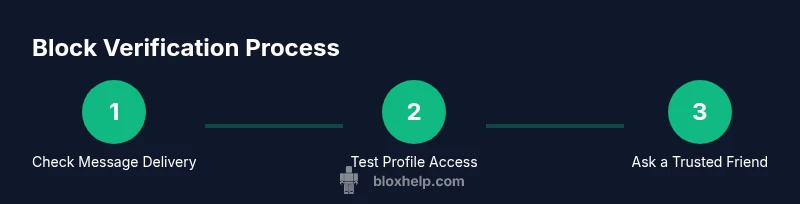
Before testing, decide to approach the situation with respect and non-harassment. Clarify that you’re seeking information for personal clarity, not to escalate or harass the other user. This mindset helps you follow Roblox rules and avoid conflict.
Tip: Keep it neutral; do not threaten or confront the other party. - 2
Attempt to send a brief message
Try sending a short, polite message asking a neutral question or confirming friendship status. If the message cannot be delivered, note the error and time. Use a calm tone and avoid repeated messages if delivery fails.
Tip: If delivery fails with a clear error, log the timestamp for your records. - 3
Check the target’s profile activity
Open their Roblox profile from your account and observe visibility and recent activity. If you cannot view any activity or updates, this could indicate a block or privacy setting. Compare with a friend’s view if possible.
Tip: Remember: profile visibility can be controlled by the other user, not just blocks. - 4
Review mutual connections and server invites
If you were part of the same groups or servers, note whether you can still see invites or join events. A block often restricts server-based interactions with that specific user, not across the entire platform.
Tip: Ask a trusted friend to observe whether they can see the same invites. - 5
Test with a secondary account (carefully)
If you have consent and safety to do so, use a second account to check if the other user’s profile is visible and whether they appear in the other account’s friend list. Do not use this to harass or bypass blocks.
Tip: Only test with permission and maintain Roblox community standards. - 6
Review settings and consider escalation
If multiple tests suggest blocking, review your own privacy settings (who can message you, who can see your profile) and consider contacting Roblox support if you believe a block is inappropriate or violates policy.
Tip: Document your steps and be ready to share evidence if asked by support.
Questions & Answers
Can I tell if Roblox blocked me on the other person's device?
Not directly. You can infer by testing messaging, profile visibility, and game invites, but results can vary due to privacy settings or platform changes. Use the safe checks described in this guide.
You can infer block status by testing messages, profile visibility, and invites, but results may vary due to privacy settings.
What should I do if I think I’ve been blocked by a friend?
Respect their space and avoid sending repeated messages. If the concern is important (harassment, safety), consider contacting Roblox support with clear details and any relevant evidence.
Respect their space and contact Roblox support if needed with clear details.
Will blocking affect me in group chats or shared games?
Blocking typically restricts direct interactions with the blocked user, but may not affect all group features. If you notice missing invitations or difficulty joining, review your settings and the other user’s status.
Blocking usually limits direct interaction, not all group features; check settings if issues persist.
Is there a way to appeal a block or get it removed?
Blocks themselves are privacy controls set by another user. You cannot remove someone else’s block; you can appeal to Roblox support if you believe there was a policy violation, providing facts and context.
Blocks are set by other users; appeal to Roblox support if there was a policy issue.
Can I block someone who has blocked me first?
Yes, blocking is mutual in effect—each user controls their own visibility and contact options. If you don’t see a response, assume the block remains in place and proceed with respectful boundaries.
Blocking is mutual in effect; respect boundaries and move on if blocked.
What if I’m unsure whether it’s a block or a temporary issue?
Consider the duration and consistency of the signs (message failures, profile visibility, invites). If uncertainty persists, give it time and retest later, or seek guidance from Roblox support.
If unsure, retest after some time or ask Roblox support for guidance.
Watch Video
The Essentials
- Verify via multiple signals, not a single clue
- Distinguish blocks from privacy settings and bans
- Use safe, respectful tests and avoid harassment
- Understand Roblox policies and reach out to support if needed
- Respect others’ boundaries and maintain positive gameplay