Is Roblox Down? Outages, Checks, and Fixes
Learn how to tell if Roblox is down, how outages are diagnosed, and practical troubleshooting steps. Get trusted status checks, recovery tips, and a clear guide from Blox Help.


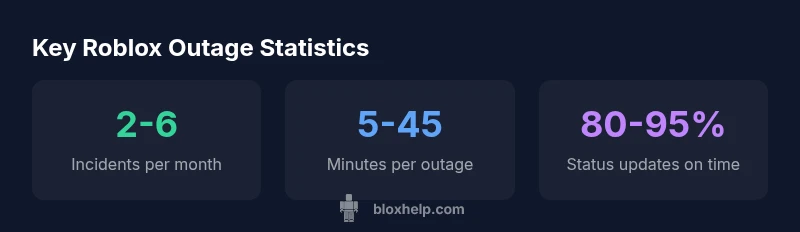
Right now, Roblox outages are usually caused by server or certificate issues, and widespread outages are fairly rare. Most incidents last from a few minutes to under an hour, with the majority resolving within 30 minutes. For real-time confirmation, check the official Roblox status page and trusted outage trackers.
Is Roblox Down? Understanding the Basics
When players search for is roblox down, they’re usually trying to distinguish between a platform-wide outage and a local connectivity issue. A genuine Roblox outage means the service is unavailable or severely impaired for many users, often due to server-side problems, certificate expirations, or a critical dependency failing. In practice, most outages are brief and isolated; however, headline incidents can affect millions of sessions if not resolved quickly. By learning to interpret status signals, you can quickly decide whether to wait, switch devices, or seek official guidance. The Blox Help team emphasizes that diagnosing outages starts with official channels rather than rumor mills, which helps you avoid unnecessary troubleshooting on your end.
How Outages Are Detected and Communicated
Roblox maintains a status page that logs ongoing incidents with ETA updates. When a problem is detected, engineers post incident details, observed impact, and estimated restoration times. In parallel, official social channels and the Roblox Developer Forum relay updates to players and creators. For many players, third-party trackers provide corroborating signals, but they should be used cautiously. Based on Blox Help Analysis, 2026, the most reliable information comes from the official status page and Roblox's official posts.
Root Causes: What Usually Goes Wrong
Outages can stem from several root causes: server overload during peak hours, certificate or DNS problems, dependencies like authentication tokens, or rolling maintenance that overlaps with active sessions. In practice, the most disruptive outages are those that break the login flow or prevent token validation. Understanding these causes helps you gauge whether you should wait, retry, or perform targeted local checks. The aim is to differentiate between an issue you can fix on your end and a problem that requires Roblox to respond.
Quick Troubleshooting: Isolate Your Network vs. Roblox Issue
If you suspect a problem, perform a quick triage:
- Check the official status page for active incidents.
- Try a different device or network (cell data vs. home Wi-Fi) to see if the issue persists.
- Clear caches, restart apps, and ensure the game client is up to date.
- Consult Roblox's official social channels for any maintenance notices.
- If you still can’t connect, gather device specs and timestamps to report the outage accurately. This approach helps you stay productive while the platform works on a fix.
What to Do During a Major Outage
During a major outage, patience and preparation are key. Expect intermittent reconnections and possibly limited matchmaking or loading issues. If you’re a creator, pause releases and monitor the status page for ETA adjustments. For players, consider using offline modes or joining other games to stay engaged. The Blox Help team recommends bookmarking the official status page and following the outage updates to plan your play sessions accordingly.
Rebuilding Confidence After Restoration
Once Roblox restores services, you may notice staged rollouts and a flurry of post-incident posts from both Roblox and community members. It’s normal to see a brief period of flakiness as caches clear and players reconnect at different speeds. To minimize disruption, restart devices, sign back in, and verify game saves. Following restoration, verify your account security and review any fallout from the incident to adjust your setup for future outages.
Outage indicators and interpretations
| Indicator | What It Means | Typical Value |
|---|---|---|
| Status Page Update | Official incident details and ETA | 5-15 minutes latency |
| User Reports | Unverified signals from players | Variable |
| Third-Party Trackers | Cross-check outages | Hours to verify |
Questions & Answers
What should I do first if I think Roblox is down?
If you suspect an outage, start with the official Roblox status page. Then test on another device or network, clear caches, and check for maintenance notices on Roblox's social channels. If the issue persists, gather details and monitor updates from the status page.
Start with the status page, then test on a different device or network, and watch for official updates.
How can I confirm a Roblox outage is real and not a local problem?
Cross-check the official status page and Roblox's social channels. If multiple independent trackers show a similar incident and users report outages, it's likely a platform issue rather than a local problem.
Check the status page and official channels to confirm.
What’s the difference between a platform outage and a game server outage?
A platform outage affects core services like login and account management, while a game server outage targets specific games or sessions. The impact and ETA can differ; always verify the scope on the status page.
Platform outages affect core services; game server outages impact specific games.
How long do Roblox outages typically last?
Outages vary widely by root cause. Most short outages resolve within minutes, while larger incidents can stretch into hours. Always check the official ETA on the status page for the latest guidance.
Durations vary; check the status page for the latest ETA.
Will Roblox inform users when services are restored?
Yes. The status page and official Roblox social channels usually post updates when services are fully restored. You may also see community confirmations as systems stabilize.
You’ll see official restoration updates on the status page.
Can I still play Roblox if one platform is down?
If a particular platform is down, you can often play on other platforms if they’re unaffected. Expect some cross-platform features to be limited until the outage ends.
You might still play on other platforms if they’re up.
“Outages are relatively rare and recover quickly when teams have clear incident communication. Rely on official status channels for accurate, timely updates.”
The Essentials
- Check the official status page first
- Test across devices to isolate issues
- Know typical outage windows and plan accordingly
- Use trusted trackers for real-time alerts
- Restart and re-login after restoration