Roblox Error Code 279: Urgent Fix Guide
Learn to diagnose and fix Roblox error code 279 quickly. This urgent guide outlines common causes—network issues, VPNs, firewalls—and provides safe steps to restore connection and resume Roblox play.


Roblox error code 279 means a network or connection issue blocking access to Roblox servers. Quick fixes: test a wired/stable network, disable VPNs or proxies, ensure ports 443 and 5222 are open, and retry. If it persists, verify Roblox server status and time sync, and try a clean restart of devices.
What Roblox error code 279 really means and why it appears
Roblox error code 279 is a generic connectivity fault that prevents your device from reaching Roblox servers. The message often appears when the game client cannot establish a stable session, resulting in immediate disconnects or failures to join. In practice, 279 is less about a single corrupted file and more about a block in the network path between you and Roblox. According to Blox Help, most cases stem from either local network issues or configuration blocks rather than the game itself. If you see 279, start by ruling out the most common, user-controlled causes before assuming the service is down. This approach saves time and avoids unnecessary re-installs or account checks.
Common causes of roblox error code 279 in 2026
The error code 279 typically emerges from a few core problems. First, an unstable or blocked network path can stop Roblox traffic mid-flight. Second, VPNs, proxies, or aggressively restrictive firewalls can peephole Roblox traffic and trigger 279. Third, an outdated or corrupted client cache may misreport connection status. Finally, server-side outages or regional issues can surface as 279 even when your setup is sound. Recognize that these causes are not equally likely in every case, so start with the simplest checks and escalate. As you work through the list, keep the keyword roblox error code 279 in mind to stay focused on the root of the problem.
Quick remedies you can apply immediately to roblox error code 279
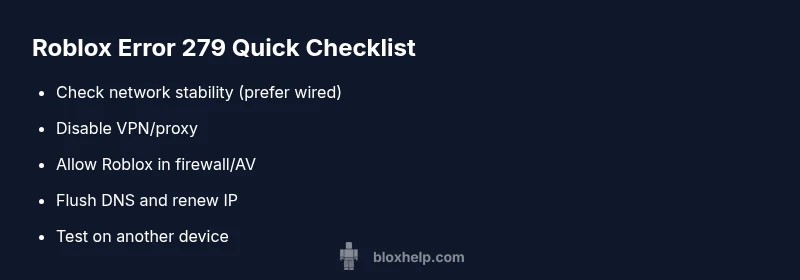
If you’re facing roblox error code 279, you can often regain access quickly with a few targeted steps. First, test your connection with a wired Ethernet if possible or move closer to your router to stabilize Wi-Fi. Second, temporarily disable VPNs or proxies and retry. Third, check firewall rules and antivirus settings to ensure Roblox.exe and RobloxPlayer.exe have unrestricted access. Fourth, flush DNS and renew your IP to clear stale routing. Finally, confirm the system clock is accurate, as time drift can affect token validation. These quick fixes address the most common roblox error code 279 scenarios and often restore normal operation without further changes.
Tracing the problem through your device without jumping to conclusions
When roblox error code 279 appears, it’s tempting to assume a server outage. In reality, you should prove that your device and network are behaving correctly first. Start by pinging Roblox servers and measuring latency with built-in tools. Observe whether other apps experience similar issues. This method helps you distinguish between a local network bottleneck and a broader service problem. If your tests pass, you can safely attribute roblox error code 279 to a server-side event and monitor official status pages while you continue playing.
Router settings, NAT, and the impact on roblox error code 279
Your router’s NAT type and port forwarding settings can influence how Roblox traffic traverses your network. If 279 appears, verify that your router isn’t filtering essential Roblox ports and that UPnP is enabled or that you’ve manually forwarded port 443 (HTTPS) and 5222 (XMPP) where applicable. Some ISP-modem combos add a firewall layer that blocks unfamiliar traffic. Adjusting these settings can often clear roblox error code 279 without plasma-level changes to your computer.
DNS resolution, time sync, and other behind-the-scenes factors
DNS misconfigurations or stale DNS caches can mislead your device into thinking Roblox servers are unreachable, triggering roblox error code 279. Run through a quick DNS flush and switch to a reliable resolver (for example, a well-known public DNS) to see if the issue resolves. Also, make sure your device time and date are synced with the network; time drift can disrupt secure connections and token validation in Roblox sessions. These steps are lightweight but impactful against roblox error code 279.
VPNs, antivirus, and security software: how they interact with roblox error code 279
Security software may block Roblox traffic if it detects suspicious activity or overly aggressive filtering. If roblox error code 279 arises after enabling a VPN or security tool, pause or disable these features momentarily to test Roblox access. If the service works without the security layer, reconfigure it to whitelist Roblox domains and executables. Always re-enable security features after testing to avoid exposure.
Roblox server status and regional issues: knowing when to pause and wait
Even when your setup is solid, roblox error code 279 can surface during regional outages or server-side maintenance. Always check Roblox’s official status page and social channels for reported incidents. If a regional issue is confirmed, monitoring is the best course; you can resume testing after RoBlox confirms restoration. This knowledge helps you avoid unnecessary repairs on your end while staying informed about ongoing service health.
When to contact support and what to gather
If roblox error code 279 persists after trying the above steps, contact Roblox support with a structured report. Include your device type, OS version, Roblox client version, network environment (Wi-Fi or wired), and a list of steps you performed and their outcomes. This documentation speeds up diagnosis and reduces back-and-forth. By sharing precise context, you enable faster, targeted help and prevent needless frustration.
Steps
Estimated time: 20-35 minutes
- 1
Check network stability
Ensure you’re on a stable connection. Prefer wired Ethernet if possible or move closer to the router to reduce interference. After adjusting, relaunch Roblox to test if 279 persists.
Tip: If you’re on Wi-Fi, a 2.4 GHz signal can be unstable; try the 5 GHz band if available. - 2
Disable VPNs and proxies
Temporarily disable any VPN or proxy service. Roblox traffic should route directly to the game servers for best compatibility. Reopen Roblox and attempt to join again.
Tip: Only disable tools you’re comfortable turning back on after the test. - 3
Allow Roblox through firewall/antivirus
Open firewall rules and antivirus settings to permit Roblox.exe and RobloxPlayerBeta.exe. Add them as trusted programs and ensure outbound/inbound rules are not blocking traffic.
Tip: If you’re unsure, use your security software’s guided app exceptions workflow. - 4
Flush DNS and renew IP
Open an elevated command prompt and run: ipconfig /flushdns, then ipconfig /release followed by ipconfig /renew. Restart the router and test Roblox again.
Tip: Flush DNS before renewing; this helps refresh stale routes quickly. - 5
Update Roblox client and clear cache
Check for updates to the Roblox launcher and the Roblox Player. Clear the cache or reinstall if needed to ensure the client isn’t using stale data.
Tip: Back up any local saved data if you’re worried about losing progress during a reinstall. - 6
Check server status and test on another device
Review Roblox’s status page for outages. If possible, try logging in from another device or network to confirm whether the issue is local or server-side.
Tip: If another device works, the problem is likely network-specific to your original device.
Diagnosis: User sees Roblox error code 279 when attempting to join a game
Possible Causes
- highUnstable or blocked network connection
- mediumVPN, proxy, or firewall blocking Roblox traffic
- lowOutdated Roblox client or corrupted cache
Fixes
- easyTest with a wired connection or stable Wi-Fi, then relaunch Roblox
- easyDisable VPN/proxy and configure firewall to allow Roblox traffic
- mediumClear Roblox cache or reinstall the client
Questions & Answers
What does Roblox error code 279 mean?
Error 279 is a connectivity fault indicating Roblox cannot reach its servers. It often stems from client-side network issues, VPNs, or firewall settings, rather than a game fault. A systematic network check usually resolves it.
Error 279 means your device can’t reach Roblox servers. Start with your network settings and work outward to fix it.
Is error 279 always a server issue?
Not always. While server outages can cause 279, most cases are client-side problems like network blocks or misconfigured firewalls. Always verify your own setup first.
Usually it’s something on your side, but server status pages can confirm outages.
Should I reinstall Roblox to fix 279?
Reinstalling is rarely required for 279. Try network fixes, DNS, and firewall adjustments first. If the problem persists after all steps, a clean reinstall can be considered as a last resort.
Usually you can fix it without reinstalling by adjusting settings first.
Can I use a VPN to avoid 279 if I disable it later?
Using a VPN can help in some blocked networks but often causes 279. Test with VPN disabled and only use a VPN if you need it for broader connectivity reasons. Reassess after logging in once.
Try without VPN first, then decide if you need it for other reasons.
What information should I provide when contacting support?
Provide device model, OS version, Roblox client version, a list of steps you tried, and results. Include screenshots or logs if possible to speed up diagnosis.
Give them your device details and steps you took so they can help faster.
Where can I check for Roblox service outages?
Check Roblox's official status page and social channels. They post real-time outages and regional issues, helping you decide if you should wait or keep trying.
Look at Roblox status pages to see if it’s a service problem.
Watch Video
The Essentials
- Verify network before deep troubleshooting
- Disable VPNs and proxies during testing
- Open Roblox ports in firewall and antivirus
- Check server status if problems persist