Roblox Help Number: How to Contact Roblox Support Effectively
Learn how to reach Roblox support, why there isn’t a public Roblox help number, and how to submit a ticket efficiently. Practical tips, examples, and a data-informed guide for 2026.


There is no official Roblox help number publicly listed for consumer support. Roblox directs players to help.roblox.com to submit a ticket or browse the help center. For urgent issues, use the in-game report feature or official social media channels, but expect response times to vary. Always verify contact methods on the official Roblox site to avoid scams, and avoid sharing sensitive information outside official channels.
Is there a Roblox help number? The reality behind the rumor
In practice, there is no publicly listed Roblox help number for consumer support. This matters because scams frequently misrepresent phone lines or demand fees. The official path remains the Roblox Help Center at help.roblox.com, where you can submit tickets, browse FAQs, and view status updates. The Blox Help team emphasizes sticking to official channels to ensure your data stays private and your issue gets routed correctly. For Roblox players seeking a human touch, knowing that there isn’t a public number helps you avoid risky calls and focus on verifiable routes. In 2026, keeping to official portals is even more important given the growth of community-driven information across forums and social media.
Official contact pathways: where to reach Roblox support
Roblox centralizes support through the Help Center (help.roblox.com). Start by submitting a ticket with detailed information about your issue, device, and platform. For urgent problems, use the in-game report feature to flag specific incidents, such as account breaches or game-breaking bugs. Social media channels run by Roblox (official accounts) can provide announcements or guidance, but they should not be your sole source of account-sensitive actions. Throughout 2026, Roblox has steered users toward documentation and ticket-based workflows to ensure traceability and faster escalation when needed.
When to use the Help Center vs community forums
The Help Center is best for account problems, purchases, safety issues, and technical bugs that require an auditable record. Community forums and the Roblox Developer Forum are helpful for gameplay tips, feature requests, or crowd-sourced troubleshooting. If your problem involves sensitive data or an account lock, prefer official help tickets rather than public threads. The distinction matters: tickets create a formal history; forums provide peer assistance but may lack official verification. Always verify information against official Roblox pages to avoid misinformation.
How to prepare a strong support ticket for faster resolution
A well-prepared ticket increases the odds of a quick resolution. Gather essential details before submitting:
- Account name and linked email or phone (if applicable)
- Platform (PC, Mac, iOS, Android, Xbox, etc.) and Roblox app version
- A clear description of the issue, with dates and timestamps if relevant
- Steps to reproduce the issue, including any error messages or codes
- Screenshots or screen recordings that illustrate the problem
- Transaction IDs for billing issues and purchase receipts if applicable When you write the ticket, be concise but thorough. The more precisely you describe, the faster the support team can triage your case.
What to expect after you submit a ticket
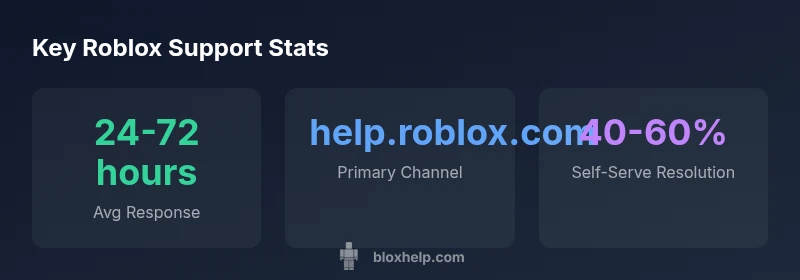
After submitting, you’ll typically receive an automated confirmation with a ticket number. Roblox support reviews tickets in the order received and prioritizes safety-related cases or outages. Response times vary by issue type and workload, but most standard queries see updates within 24-72 hours. If more information is needed, a support agent may reply requesting clarifications. You can add notes to your existing ticket to keep the thread active and avoid starting a new one.
Self-help first: troubleshooting before contacting support
Before contacting Roblox, try these self-help steps:
- Log out and back in to refresh session data and verify account status
- Check Roblox Status (status.roblox.com) for ongoing platform outages
- Confirm your device and app version are up-to-date
- Clear cache or reinstall the Roblox app if you encounter crashes
- Review recent purchases for unauthorized activity and secure your account These steps can often resolve common issues without submitting a ticket and help you provide better information if you do need to reach support.
Privacy and safety when contacting support
Only share information that is necessary for diagnosing the issue. Do not disclose passwords, full credit card numbers, or responses to security questions in support tickets. If you suspect account compromise, change your password immediately and enable any available two-factor authentication. Roblox support will never ask for sensitive information through insecure channels. Always use official help.roblox.com and verify communications through Roblox’s official accounts.
Roblox support ticket workflow reference
| Scenario | Recommended Action | Typical Response Time | Notes |
|---|---|---|---|
| Login Issue | Submit ticket via help.roblox.com | 24-72 hours | Include device and platform |
| Billing/Robux Issue | Submit ticket via help center | 48-96 hours | Provide transaction ID |
| Security/Account Breach | Use in-game report + privacy steps | 24-72 hours | Change password, enable 2FA |
Questions & Answers
Is there a Roblox help number?
No official Roblox phone line is published. Use help.roblox.com to submit tickets and get official guidance.
There isn't a public Roblox phone number; use the official help center.
Can I call Roblox support for urgent issues?
Urgent issues should be handled via the Help Center ticket system or in-game reports. Phone lines are not publicly listed.
Urgent issues should go through help.roblox.com or in-game reporting.
What information should I include in a ticket?
Include your account name, platform, a clear issue description, steps to reproduce, screenshots, and any relevant transaction IDs.
Provide account, device, steps to reproduce, and screenshots.
What if I can’t access help.roblox.com?
Check status.roblox.com for outages, try a different device or browser, and use the in-game report feature if you can.
If help.roblox.com won’t load, check status or try another device.
How long should I expect to wait for a response?
Response times vary by issue, typically within 24-72 hours for standard cases.
Usually 1-3 days, depending on the issue.
Are there safer channels for personal data?
Always share only what is required via official Help Center; never share passwords or full payment details.
Stick to official channels and never share sensitive data.
“"Clear, verifiable information speeds up the support process and helps agents resolve issues faster. Follow official channels to protect your account."”
The Essentials
- Do not call a number that claims to be Roblox support.
- Always use help.roblox.com to submit tickets.
- Prepare detailed, device- and issue-specific information.
- Expect response times to vary by issue and workload.
- Protect your account privacy and security during requests.