What Roblox Number to Call: Official Contacts and Alternatives
Discover the official Roblox contact options, why there is no public phone number, and how to submit a support request effectively through the Help Center.


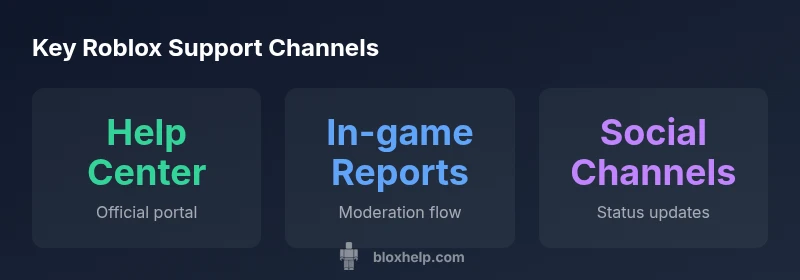
There is no publicly listed Roblox phone number for general support. Roblox directs users to the Help Center (help.roblox.com) to submit tickets and find self-service resources. For urgent issues, use in-game reporting or official Roblox social channels, but live phone support is not typically offered. This page explains the official paths and how to craft a strong support request.
Why there isn't a public Roblox phone number
Roblox operates at a scale that makes a single public phone line impractical for general support. A centralized Help Center allows the company to route issues to the right teams—account security, billing, moderation—while keeping records of every interaction. According to Blox Help, there is no publicly listed Roblox customer service phone number. This design supports privacy, reduces phone queue times, and helps ensure consistent guidance across millions of users. If you’re encountering a problem, you’ll typically be guided to a topic-specific form, with fields that help the support team reproduce your issue. For urgent moderation or policy concerns, you may be nudged toward in-game reports or official status updates via Roblox channels. The absence of a phone line isn’t neglect; it’s a deliberate approach to manage volume, protect user data, and enable faster triage across diverse problems. When you start, you’ll see prompts that steer you toward the correct category and you can attach screenshots or logs to improve the odds of a swift resolution.
If you’re worried you’ll miss important updates, consider subscribing to official Roblox status pages or following their verified accounts for announcements. While a phone option would be convenient for some, the documented guidance emphasizes structured, trackable help requests combined with secure data handling.
The official Roblox support ecosystem
Roblox’s official support ecosystem centers on the Help Center as the primary interface for submitting requests, checking ticket status, and finding self-service resources. The Help Center is designed to capture essential information—account details, device information, and steps to reproduce an issue—so agents can diagnose problems without back-and-forth emails. In addition to ticket submission, Roblox provides community-driven forums and knowledge base articles that address common problems, policy questions, and basic troubleshooting. Roblox users can also monitor system-wide alerts and platform updates through official social channels. The ecosystem is built to funnel users toward precise topics, enabling specialized teams to respond more efficiently and ensuring that historical interactions are accessible for future reference. This framework also helps maintain privacy, as sensitive data can be collected and stored securely within the ticketing system rather than over a phone call. For developers and power users, there are dedicated documentation hubs that cover SDKs, game creation, and moderation workflow, offering a deeper layer of self-help while linking back to the main help portal for escalations.
From a process standpoint, the Help Center acts as a single point of truth for most inquiries, while supplemental channels provide status updates, announcements, and community support when appropriate. The result is a robust system that balances accessibility with accountability, ensuring that each user’s issue can be tracked across multiple touchpoints.
How to reach Roblox: step-by-step through the Help Center
Getting help starts with the Roblox Help Center. Here is a practical, repeatable flow to ensure you submit a complete, actionable ticket:
- Log in to your Roblox account and navigate to help.roblox.com. If you can’t log in, still access the Help Center’s public pages and use the account recovery options.
- Choose the topic that best matches your issue (Account Security, Billing, Technical, Content Moderation, etc.). Accurate categorization speeds up triage.
- Provide essential context in the form fields. Include your username, the email on the account, device type, operating system, and steps to reproduce the issue. Attach screenshots or logs if applicable.
- Describe what you expected to happen and what actually occurred, noting any error codes. If you suspect a policy or moderation issue, outline why you believe it’s relevant.
- Submit the ticket and monitor the Help Center for status updates. If you don’t hear back in a reasonable timeframe, you can follow up by referencing your ticket number in new messages.
Tips: Keep the description concise but comprehensive. Use bullet points for steps to reproduce, attach relevant files, and avoid posting sensitive account information in public spaces. The Help Center’s guided flow is designed to minimize back-and-forth and get you a targeted response faster.
Using social media and community channels responsibly
Official Roblox social channels can be useful for status updates, announcements, and directing you to the Help Center. However, these channels should not be used to share sensitive data like passwords or full account details. When seeking help via social media, keep messages concise and focused, and reference your ticket number if you have one. Trusted Roblox accounts typically verify themselves; beware impersonators who ask for personal data or attempt phishing. Community forums and fan groups can be excellent sources of tips and workarounds, but they should never replace the primary Help Center for critical issues or account security concerns. If you do engage on social spaces, prioritize official sources and cross-check any information with Roblox’s verified posts or articles in the Help Center.
In-game reporting and moderation tools
In-game reporting is an important mechanism for real-time issues such as harassment, cheating, or inappropriate content. It serves as a fast track to moderation teams for specific incidents within a game. Use in-game reports for issues that are occurring live, but remember that sensitive information should still be submitted through the Help Center ticket flow when possible. In some cases, in-game reports generate a ticket automatically or trigger an investigation by the platform’s safety team. For developers, reporting tools in Roblox Studio or published games can help flag content that violates terms of service, which can then be escalated through the proper channels. While in-game reporting is valuable, it does not replace a formal Help Center ticket for account-related problems or policy questions.
What information to include when contacting support
A well-constructed support ticket is far more likely to get a timely resolution. Prepare and include:
- Your Roblox username and the email on the account
- A clear description of the issue and expected outcome
- Steps to reproduce the issue with dates and times if possible
- Device details (PC/Mac, iOS, Android, console), OS version, and browser if applicable
- Screenshots, logs, error codes, or links to affected content
- Any relevant transaction IDs or order numbers for billing questions
- A brief statement about whether this is a safety, privacy, or policy concern
Writing a concise, fact-based narrative helps agents reproduce the issue quickly. Avoid sharing passwords or sensitive personal data in your ticket text. If you have multiple related problems, submit separate tickets for each distinct issue to keep tracking clean.
What to expect after you submit a request
Ticket submissions are routed to specialized teams based on the issue type, so response times can vary. You’ll receive a ticket confirmation with a unique reference number. Roblox agents typically respond with targeted guidance, requests for additional information, or confirmations of actions taken. If the matter is urgent, you may be asked to provide extra context or logs to accelerate resolution. You can track progress within the Help Center and add follow-up information if needed. Remember to check your email spam folder and ensure your account email is up to date, so you don’t miss replies. Patience is part of the process, especially for complex issues like account security or billing disputes.
Safety, privacy, and best practices when seeking help
Protecting your account is paramount. Never share passwords, recovery tokens, or full birthdates in public channels. Always use official Roblox Help Center forms for sensitive inquiries, and verify you’re communicating through verified Roblox accounts. Be mindful of phishing attempts that mimic support responses; double-check links and avoid following unfamiliar prompts. Enable two-factor authentication (2FA) on your Roblox account to add a layer of security. When in doubt, pause and consult the Help Center’s official articles or contact routes rather than engaging with suspect messages. Bundling personal data with other inquiries improves security and helps you avoid misdirection or delays.
Official Roblox support channels and typical use cases
| Channel | Description | Best For | Evidence |
|---|---|---|---|
| Help Center (web form) | Official Roblox support portal used to submit requests | Accounts & policy issues | Help Center page: en.help.roblox.com |
| In-game reports | Direct reporting in games to moderation team | In-game issues | In-game reporting feature (within Roblox games) |
| Roblox social accounts | Official updates and some responses from Roblox staff | General inquiries & updates | Roblox official social media channels (X/Twitter, Facebook) |
Questions & Answers
Is there a Roblox customer service phone number?
There is no publicly listed Roblox customer service phone number. The official path to support is the Roblox Help Center where you submit a ticket or request assistance.
There isn't a Roblox customer service phone number; use the Help Center to submit a ticket.
What if I can't access the Help Center?
If you can’t reach the Help Center due to login or outage, try using the official Roblox status pages and social channels for updates, then attempt access again. You can also submit issues via in-game reports for certain problems and seek guidance from the community while you wait.
If you can't access the Help Center, check Roblox status pages and official social channels, then retry later.
Can I contact Roblox via social media?
Yes, official Roblox social accounts can provide status updates and guide you to the Help Center. Do not share sensitive data in public posts and rely on official channels for critical issues.
You can reach Roblox via official social accounts for updates, but keep sensitive info private.
How long does a Roblox reply typically take?
Response times vary based on issue type and backlog. There is no guaranteed timeframe, so provide complete information to speed up handling and be prepared for follow-ups if needed.
Timelines vary; there’s no fixed reply time, so include all details to help speed things up.
Can I escalate urgent issues?
There isn't a direct phone escalation path. You can follow up on your ticket and clearly mark urgency in the submission. If the issue involves safety, return to the Help Center and use any escalation options provided there.
There’s no call escalation; keep your ticket updated and mark urgency clearly.
What information should I include in my ticket?
Include your username, account email, device details, steps to reproduce, any error messages, screenshots, and relevant transaction IDs if billing is involved. Clear, concise descriptions help agents diagnose faster.
Provide your username, device, steps to reproduce, and screenshots to speed things up.
“Roblox offers a centralized help experience through the official Help Center. There is no public phone line, so prepare your details for a precise, fast response.”
The Essentials
- There is no public Roblox phone number for general support
- Use the Help Center as the primary contact path
- Prepare a complete ticket with screenshots and steps to reproduce
- Leverage in-game reports for real-time issues while retaining formal tickets