Can You Get a Roblox Account Back Without Email? A Practical Recovery Guide
Learn how to recover a Roblox account without the registered email, with step-by-step actions, ownership proofs, and safety tips for 2026. Blox Help walks you through alternatives and best practices.


Yes. If you no longer have access to the registered email, you can pursue recovery through Roblox Support using alternative verification. Gather your Roblox username, any recent purchase receipts, related device info, and proof of account ownership. Expect to verify via security questions or linked phone/third-party accounts and follow Roblox’s official recovery steps.
Can You Recover a Roblox Account Without Email? Realistic Expectations
Understanding the path to account recovery when you’ve lost access to the registered email begins with setting realistic expectations. In most cases, Roblox relies on ownership proofs and verifiable details to reset access rather than simply reissuing a login link. According to Blox Help, the recovery process without email is possible when you can demonstrate you own the account through alternative data — such as the username, recent in-game activity, linked devices, or purchase history. The key is to present a coherent story of ownership that Roblox support can verify. This often means you’ll go through a formal verification flow and may need to answer questions about past activity. If you’re trying to recover now, prepare to follow official recovery steps and be patient through the process. This approach aligns with best practices for safeguarding accounts when email access is compromised.
The user should also consider broader security practices. For Roblox players and aspiring developers, understanding how account recovery fits into the larger security model helps prevent future issues. The guidance here focuses on practical, actionable steps rather than theoretical scenarios, and it emphasizes using official channels to minimize risk.
Remember: the goal is to prove ownership and restore access without relying on email verification. This is not guaranteed in every case, but with the right information and persistence, many users can regain their accounts.
Brand-wise, the Blox Help team notes that staying organized and following the official process increases your chances significantly.
How Ownership Verification Works Without Email on Roblox
Roblox handles account recovery without email by cross-referencing multiple data points that only the legitimate owner would know or control. Even without email access, you may be asked to provide your username, approximate last login times, device fingerprints, payment receipts, or details about past Robux purchases. Roblox also considers linked accounts (such as mobile or console logins) if they’re tied to the same user. A critical factor is consistency: the information you provide should align with Roblox’s records. Do not improvise or guess; incorrect or vague answers can stall the process. By compiling accurate details, you increase the odds that a support agent can verify ownership and reset access. This process emphasizes legitimate ownership signals over password guesses.
For players who maintain a careful record of their account activity, the road to recovery without email becomes more straightforward. The more concrete the ownership signals, the faster the resolution tends to be, though timelines vary by case.
What Information You Can Provide Instead of an Email
If you’ve lost access to your email, there are several alternative signals Roblox can use to verify ownership. Useful information includes your Roblox username or ID, the approximate date you created the account, any recent purchases with receipts, the devices you’ve used to log in, and the last time you had successful access. Providing details about in-game items you own, birthday or parental controls configuration, and familiar friends or clans can also help anchor your claim to the account. The key is accuracy and traceability: the more concrete the data, the more credible your claim appears to Roblox support. If you have access to a linked phone number or alternate authentication method, mention it, because these can serve as additional verification channels.
Additionally, maintain a calm and precise narrative when you describe the circumstances around losing email access — avoid blaming others, stick to the facts, and be ready to supply supporting documents when requested.
Step-By-Step Recovery Options You Can Try (Overview)
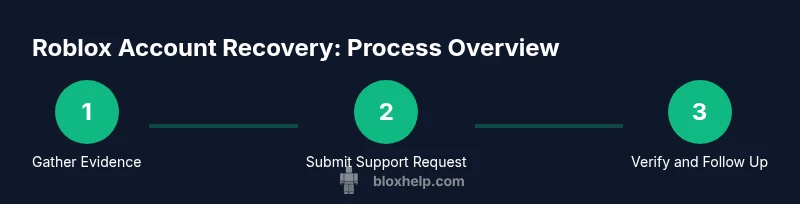
A practical recovery path without email typically includes collecting ownership signals, submitting a formal support request, and responding promptly to any verification prompts. Start by auditing what you can prove about the account (username, last login, devices, purchases). Then, contact Roblox Support through the official recovery form or support channel and clearly state you’ve lost access to the registered email. Attach any relevant receipts or proof of ownership and describe how you’ve been using the account. After submission, monitor for follow-up requests and respond quickly. Depending on the case, Roblox may guide you through additional verification steps or require you to set a new email and security settings once access is restored. Always use official channels to minimize risk of phishing or scams.
The recovery journey can vary; some users regain access after a single exchange, while others may require longer verification. Stay patient and organized, and keep all evidence ready for quick submission.
Step 1: Prepare Evidence and Details
This initial step is foundational. Gather your username or Roblox ID, the approximate creation date, last login times, and devices you used to access the account. Compile receipts from purchases and any payment methods linked to the account. If you can recall support interactions or prior Roblox support ticket numbers, document those as well. The goal is to assemble a concise, verifiable narrative that aligns with Roblox’s records. Create a single document or spreadsheet with labeled sections for each data point to avoid confusion when you submit the request. If something doesn’t feel solid, don’t include it—too much nonverifiable data can slow the process.
Having a clear dossier reduces back-and-forth with support and speeds up verification.
Step 2: Submit a Support Ticket with Ownership Proof
Open the official Roblox Support Center and locate the account recovery form. Clearly explain that you no longer have access to the registered email and provide your compiled ownership data. Attach receipts, screenshots, or any documented proofs; include your username and any linked devices or payment history. Be explicit about the request: you’re seeking to regain access and update contact information. After submission, bookmark the ticket number and check for updates regularly. If Roblox requests additional details, respond promptly and concisely to keep the process moving.
Consistent, verified information is your best ally in this step.
Step 3: Respond to Verification Requests Promptly
Support teams may ask for clarifications or extra proofs to confirm ownership. Respond quickly with precise data, and avoid long delays in your replies. If possible, provide multiple forms of verification in a single response (e.g., identity-related information plus recent purchase details). When communicating, keep the tone professional and focused on facts. If you cannot provide a requested item, explain why and propose alternative verifications you can supply. Timely responses improve your chances of a successful recovery.
Anticipate follow-ups and stay organized.
Step 4: Wait for Roblox Response and Next Steps
After you’ve submitted your request and provided proofs, the review process begins. Response times vary due to workload and case complexity. Use the ticket number to track progress; if you haven’t heard back within a reasonable window, consider sending a polite follow-up message referencing your ticket number. Once Roblox verifies ownership, you may be asked to set a new email and reconfigure security settings, including enabling two-factor authentication where available. Throughout this phase, avoid sharing sensitive information outside official channels.
Patience and clear records are essential here.
Step 5: Post-Recovery Security and Best Practices
When access is restored, immediately update your account security. Change the password to a strong, unique one, enable two-factor authentication if possible, and review connected apps or devices. Remove any unknown linked services and double-check purchase histories for unauthorized activity. Consider updating your recovery options to include a current email and phone number. Finally, implement habits that reduce future risk: use a password manager, keep software up to date, and remain cautious of phishing attempts.
A secure reset now protects your account going forward.
Final Notes: Patience, Precision, Protection
Recovering a Roblox account without email hinges on precise ownership verification and adherence to official procedures. While the path can be slower than standard email-based recovery, a well-documented request with solid proofs stands the best chance. Throughout the process, keep communications within Roblox’s official channels and avoid sharing sensitive details publicly. By staying organized and proactive, you’ll maximize your odds of regaining access and securing your account for the future.
Tools & Materials
- Roblox username or ID(The core identifier to locate the account in Roblox systems)
- Last known login information(Approximate date/time or device used for the last successful sign-in)
- Purchase receipts / payment details(Receipts or payment method details tied to in-game purchases)
- Proof of ownership(Screenshots of in-game items, creator content, or associated data)
- Linked devices or accounts(Any alternate logins (mobile, console, or linked accounts))
- Support ticket numbers(If you previously contacted Roblox Support)
Steps
Estimated time: Varies; depends on Roblox support queue and verification needs
- 1
Gather essential information
Collect your username, approximate account age, last login times, devices used, and any purchase receipts. Organize this data into a single reference to present to Roblox Support. This minimizes back-and-forth and demonstrates ownership clearly.
Tip: Create a single document with labeled sections for quick copying into forms. - 2
Submit a formal recovery request
Use the official Roblox Support Center to submit a recovery request, explicitly stating you’ve lost email access. Attach your evidence and describe your ownership signals succinctly. Include your ticket number if you already reached out.
Tip: Be concise but thorough; avoid extraneous details that don’t support ownership. - 3
Respond to verification prompts
If Roblox asks for more information, reply promptly with precise data. Provide multiple verification forms if possible and explain any gaps honestly. Timely responses help keep the process moving.
Tip: Keep all submissions in one thread to reduce confusion. - 4
Await a decision and follow up
Granted access may require a confirmation step; if you don’t hear back in a reasonable timeframe, send a short follow-up referencing your ticket. Track progress with the ticket ID.
Tip: Check spam folders for Roblox messages to avoid missing updates. - 5
Secure the account after recovery
Once access is restored, immediately update your password, enable two-factor authentication if available, and review connected devices and payment activity. Set reliable recovery options.
Tip: Use a password manager and a unique password for Roblox.
Questions & Answers
Can I recover a Roblox account if I no longer have access to the email on file?
Yes, you can try recovery through Roblox Support using alternative verification methods. Provide ownership proofs and be prepared to answer questions about your account. Timely, precise responses improve your chances.
Yes. You can try recovery through Roblox Support using alternative verification methods and ownership proofs. Be precise and timely with your responses.
What information should I provide to Roblox for recovery without email?
Provide your username or Roblox ID, last known login details, device information, and any purchase receipts. Attach any screenshots or proof of ownership that corroborate your claim.
Give your username, last login details, devices, and receipts as proof of ownership.
How long does Roblox support take to respond to a recovery request?
Response times vary based on queue length and case complexity. Be prepared for a wait and check your ticket for updates rather than repeatedly re-submitting.
Response times vary; check your ticket for updates and avoid multiple submissions.
Can I use a linked phone number for verification if I lost access to email?
If a phone is linked to your Roblox account, it can serve as an additional verification channel. Include any accessible linked number in your report and follow Roblox’s instructions.
Yes, if a phone is linked, it can be used for verification. Include it in your report.
What should I do after regaining access to protect my account?
Immediately change your password to a strong, unique one, enable two-factor authentication if available, and review connected devices and purchase history.
Change your password, enable 2FA if available, and review connected devices after recovery.
Is there a risk the account can be permanently lost if no email is available?
There is a risk if ownership cannot be proven. Following the official recovery steps and providing solid proofs increases recovery chances, but guarantees cannot be made.
There is some risk if ownership cannot be proven, but following official steps helps.
Watch Video
The Essentials
- Prepare verifiable ownership data before contacting support
- Use official Roblox channels and respond promptly
- Secure the account immediately after recovery