How to Add Roblox Gift Card: Redeem and Use Your Balance
Learn how to add roblox gift card to your account, redeem codes, and use your balance for games, avatar items, and more with our step-by-step guide.


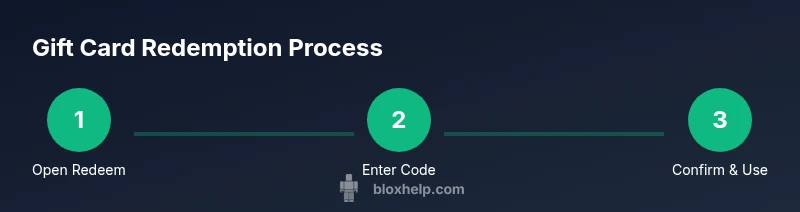
You add Roblox gift card funds by redeeming the card code on Roblox. To start, have a valid Roblox account and the gift card code. Go to the Redeem page, enter the code, and confirm. The balance is added to your Roblox account and can be used for purchases in games, avatar items, and more.
What does it mean to add a Roblox gift card?
If you’re wondering how to add roblox gift card, you’re in the right place. A Roblox gift card is a prepaid balance that you can redeem to fund your account. Once redeemed, the balance becomes instantly usable for Roblox game passes, avatar items, virtual currency, and other in‑game purchases. This guide walks you through every step, from locating your code to spending the balance responsibly. It also covers common issues, safety tips, and best practices so you can enjoy a smooth wallet experience across devices.
Where to find your gift card code and how to copy it
Roblox gift cards come in physical and digital forms. For physical cards, the code is typically on the back of the card under a protective coating. For digital cards, you’ll receive the code via email or a confirmation screen after purchase. Always copy or carefully transcribe the code exactly as shown; a single incorrect character will prevent redemption. Keep the code private and store it in a secure note until you’re ready to redeem. If you’ve already used the code, you won’t be able to redeem it again, so treat it like cash and don’t share it broadly.
How to redeem a Roblox gift card across devices
Redeeming a Roblox gift card is straightforward whether you are on a desktop, tablet, or smartphone. The general flow is the same, but the interface can look different by device. You’ll visit Roblox’s Redeem page, enter the exact code, and confirm the transaction. The balance updates immediately in your account. If you run into issues, verify your region, ensure you’re logged into the correct account, and retry on a stable connection.
What happens after you redeem the card
After successful redemption, the gift code balance is added to your Roblox account as Roblox Buyer Balance or Robux depending on the card type and region. This balance can be spent on Roblox Avatar items, game passes, limited-time bundles, and other in‑game content. If you ever see a balance you didn’t authorize, contact Roblox Support right away and review your security settings. Keep your login information private and enable two-factor authentication where available.
Common problems and how to fix them
Not all redemptions go perfectly on the first try. Common problems include an invalid code, an already redeemed card, or regional restrictions. Double-check the code for mistyped characters, confirm you’re redeeming in a supported country, and make sure you’re logged into the correct account. If the code still won’t redeem, contact Roblox Support with the card details and timestamp of purchase. Always use official channels to avoid phishing attempts.
Safety, scams, and privacy when using Roblox gift cards
Be cautious of scams asking for your gift card code outside the official Roblox site. Never share codes in public chat or with untrusted sources. Use secure networks and avoid public Wi‑Fi for sensitive transactions. If a deal sounds too good to be true, it probably is. The best practice is to redeem only on Roblox’s official site and keep your device protected with updated software.
Using your Roblox balance for purchases and budgeting tips
Your redeemed balance can be spent on a variety of Roblox items, including avatar accessories, gear, and game passes. Create a simple budget: allocate a portion for avatar cosmetics, another for game passes, and keep a small safety reserve for emergencies or limited-time offers. Review store prices frequently and compare between Robux purchases and direct gift-card value when relevant. Remember that gift card balances typically apply to official Roblox stores and related purchases.
Authoritative sources and next steps
For official guidance, refer to Roblox Help and trusted consumer resources. The following sources provide additional context and safety tips on gift cards and online purchases:
- https://help.roblox.com/hc/en-us/articles/115004669946-Where-can-I-redeem-a-Roblox-Gift-Card-
- https://www.ftc.gov/news-events/press-releases/2020/01/ftc-issues-warning-gift-cards-scam
- https://www.consumerfinance.gov/
By following these steps and staying aware of scams, you’ll maximize your Roblox experience while protecting your balance.
Authoritative sources (quick reference)
- Roblox Help: Where can I redeem a Roblox Gift Card? (help.roblox.com)
- FTC Gift Card Safety (ftc.gov)
- Consumer Financial Protection Bureau (consumerfinance.gov)
Tools & Materials
- Roblox account(Ensure you can access the account you want to fund)
- Gift card code(Physical card back cover or digital code. Copy carefully)
- Device with internet(Desktop, tablet, or mobile device with a web browser or Roblox app)
- Secure storage(Keep codes private until you redeem)
Steps
Estimated time: 5-15 minutes
- 1
Open Roblox Redeem Page
Navigate to the official Roblox Redeem page using a secure browser. Make sure you’re logged into the account you want to fund. The URL is typically on the Roblox site under the shopping or support sections.
Tip: Bookmark the official Redeem page to avoid phishing sites. - 2
Enter the Gift Card Code
Type the code exactly as shown on your card or in your email. A single misread character will prevent redemption. Review each character carefully before submitting.
Tip: Use copy-paste only if you’re sure the code is copied correctly; avoid spaces. - 3
Confirm Redemption
Submit the code and confirm the redemption. The system will display the updated balance once successful. If prompted, review terms and ensure you’re redeeming in a supported region.
Tip: Take a quick screenshot of the successful confirmation for your records. - 4
Check Your Balance
Return to your Roblox account page and verify that the balance reflects the amount of the gift card. This may appear as Robux or a buyer balance depending on the card and region.
Tip: Refresh the page if the balance doesn’t update immediately. - 5
Make a Purchase or Save for Later
Choose a game pass, avatar item, or other content. You can also reserve the balance for future releases. Some items may require a specific balance type.
Tip: Compare prices across items to maximize value; consider saving for limited-time offers. - 6
If Redemption Fails
If the code won’t redeem, double-check the code, region compatibility, and account. Contact Roblox Support with purchase date and code image if needed.
Tip: Avoid repeated attempts in quick succession to prevent temporary blocks on the code.
Questions & Answers
Can I redeem a Roblox gift card on mobile devices?
Yes. The Roblox Redeem page works on mobile browsers and the Roblox app. Use the exact code and ensure you’re signed into the correct account.
Yes, you can redeem on mobile. Open the Roblox app or mobile browser, go to Redeem, enter your code, and confirm.
What should I do if the code is invalid or already redeemed?
If the code is invalid or already redeemed, double-check the characters and try again. If it still fails, contact Roblox Support with the card details and purchase information.
If the code is invalid or used, verify the code and contact Roblox Support with your purchase info.
Do Roblox gift cards expire?
Gift cards typically do not expire, but terms may vary by region. Always check the card’s terms and Roblox’s regional policies.
Gift cards usually don’t expire, but review regional terms to be sure.
How can I check my Roblox balance?
Log into your account and view the balance indicator on the main page or balance tab. The amount reflects immediately after a successful redemption.
Sign in and check the balance on your account page; it updates right after redemption.
What if I get charged twice for a single card?
If you notice a duplicate charge, contact Roblox Support with the gift card code and purchase details. They can investigate and correct the balance.
If you’re charged twice, contact Roblox Support with your card info to fix it.
Watch Video
The Essentials
- Know where to redeem a Roblox gift card on official channels
- Double-check codes to avoid wasting funds
- Balance updates immediately after successful redemption
- Protect your account with strong security practices